


Choosing NAS Storage for Video Editing: What You Should Know
As video editors regularly deal with enormous 4K, 6K, 8K and even greater resolution media files, having robust and specialized storage solutions becomes paramount. Directly attached external storage can be rather limiting for collaborative workflows and scaling storage needs. This is where a dedicated Network Attached Storage (NAS) system can provide major benefits in meeting video editing's unique and demanding storage needs.
A well-designed NAS offers centralized and consolidated storage, excellent scalability, continuous availability in case of drive failures, RAID data protection, simplified management, and potent hardware optimized specifically for media workflows. When selecting a NAS, key factors to consider include connectivity speeds, transcoding power, drive bays, port options, data protection capabilities, and user-friendly software features tailored to creative workloads.
Video Editing's Data Storage Needs
Modern video editing workstations must be optimized to smoothly manipulate massive media files and timelines. High-resolution formats like 4K, 6K and 8K require vast amounts of bandwidth and storage capacity. Here are some of the core storage considerations when editing video:
Massive Capacity
Raw high-resolution video files consume gigantic amounts of storage space. For example, 1TB can only hold approximately 10 minutes of uncompressed 8K footage.
Blazing Fast Access Speeds
Video editing involves frequent reading from and writing to storage throughout the entire workflow. Slow load times or lag can severely impact productivity and creative flow. Sustained high throughput keeps the editing process smooth and snappy.

Multi-Editor Collaboration
Storage solutions need to allow seamless sharing of centralized media bins and collaborative editing projects across several users simultaneously without lag or Bottle-necking.
Future Scalability
Media libraries inevitably grow larger over time. Storage must be designed for cost-effective expansion and upgrading to meet increasing capacity demands down the road.
Why a NAS System Over Direct Attached Storage
Dedicated NAS solutions offer clear advantages over direct attached external drives via USB, eSATA or Thunderbolt:
Centralized Storage
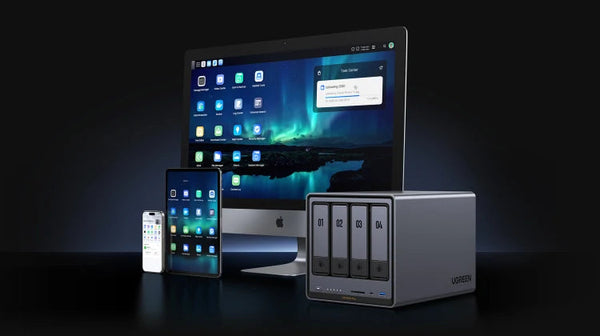
A NAS provides centralized storage of all media and projects in one place, which greatly simplifies organization and searches. It seamlessly integrates with editing workstations while keeping assets consolidated.
Limitless Scalability
Adding more capacity to a NAS is straightforward as storage needs grow over time. Direct attached external drives ultimately max out at the number of physical drive ports available.
Continuous Availability
If a direct attached external drive fails or its interface is damaged, all media on that drive is inaccessible until repaired or replaced. A NAS array with RAID data protection ensures continuous access to assets in the event of a drive failure.
Read More: What is RAID?
Advanced RAID Data Protection
A NAS system can implement advanced RAID data storage configurations. RAID duplicates data across multiple drives to prevent data loss if one drive fails. Direct attached drives lack any redundancy.

Simplified Collaboration
Centralizing storage in a NAS simplifies sharing common media assets between users compared to attaching multiple external drives.
Remote Accessibility
Users can remotely access and edit media on a NAS from anywhere with an internet connection rather than needing local physical access to external drives.

Optimal NAS Hardware Specifications for Media Workflows
When evaluating NAS systems tailored for media editing and creative workflows, look for models designed with:
Powerful Processor
A modern, multi-core processor provides the horsepower necessary for smooth video playback and on-the-fly transcoding of media into edit-friendly formats.
4+ Drive Bays
More drive bays enable installing higher capacity hard disk drives (HDDs) optimized for cost-efficient video storage. Multiple drive bays also allow for RAID 5 or 6 for an optimal balance of storage capacity and protection against drive failure.
10GbE Connectivity
Step up from standard gigabit ethernet to 10GbE connectivity. This enables much faster network transfers of massive media files to and from the NAS. Some models also allow link aggregation of two Ethernet ports for theoretical throughput up to 20Gbps.
Thunderbolt 3 Connectivity
Thunderbolt 3 ports allow direct connections to cameras and peripherals with maximum transfer speeds up to 40Gbps. Look for models with two or more Thunderbolt ports to enable link aggregation.
Quiet Cooling Design
Video and audio editors require minimal noise distraction. NAS units with superior internal cooling designs allow quiet operation under load while easily dissipating heat from high-performance components.
Key Differences: Wireless Connectivity vs Wired Ethernet
Though convenient and portable, WiFi simply can't match the speed, reliability and consistent performance of wired Ethernet connectivity:
Maximum Throughput
10GbE wired connectivity provides full bandwidth capacity without interference for ultra fast media transfers between the NAS and editing workstations.
Minimal Lag
WiFi is often subject to signal interruptions, interference and Bottlenecks that translate directly into latency, dropped frames and editing lag. Wired ethernet provides a clean, uninterrupted pipeline.
Link Aggregation
Combining two high-speed Ethernet ports allows multiplying theoretical throughput to up to 20Gbps using LACP. WiFi lacks any comparable option to bond for increased bandwidth.
Less Signal Degradation
Wired Ethernet maintains signal integrity over longer distances compared to WiFi's susceptibility to degradation through walls and interference from other devices.
Consistent Signal
Wired Ethernet provides a steady, uninterrupted connection. WiFi signals can vary leading to inconsistent speeds and connectivity drops.
Security
Wired Ethernet offers physical isolation of media from the outside network. WiFi presents a potential attack vector for data breach.
Configuring RAID for Performance, Capacity and Redundancy
The RAID data storage configuration chosen in a NAS array impacts the overall storage capacity versus data protection and performance:
RAID 5
Provides good overall storage capacity efficiency while allowing the NAS to tolerate failure of a single drive. RAID 5 write speeds are comparable to a single drive. Rebuilding an array after drive failure carries some risk until complete.
RAID 6
Provides double drive fault tolerance by using a dual-parity mechanism. But RAID 6 write speeds can suffer compared to RAID 5 due to the higher parity overhead. Avoid using small capacity drives due to the impact on usable space.

RAID 10
Configured by mirroring and striping drives, RAID 10 optimizes read and write speeds but reduces usable NAS storage by half. Choose this RAID level if maximum throughput is the top priority.
Carefully evaluate your capacity requirements, workflow performance needs and acceptable risk tolerance when selecting the ideal RAID level for your video editing NAS.
Key NAS Software Features for Smoother Video Editing
The right software features fine-tuned for video editing can dramatically enhance real-world NAS usage:
Fast File Transfers
A well-designed operating system enables smoothly transferring enormous media files between local editing workstations and the centralized NAS storage pool. Look for average transfer rates faster than 1Gbps.
On-the-fly Media Transcoding
Optimal NAS software can transcode stored media assets on-demand into formats optimized for playback across multiple devices with minimal latency.
Intuitive Remote Access
A secure and intuitive interface allows authorized media editors to remotely access and manage NAS-centralized projects and media bins from anywhere with an internet connection.
Seamless App Integrations
Tight integration with popular media editing apps like Final Cut Pro, Premiere Pro and DaVinci Resolve through plugins improves real-world NAS workflows.
Key Factors for Future NAS Scalability and Expandability
Given how rapidly media libraries tend to grow over time, consider how easily the NAS storage can scale:
Modular Storage Expansion
A flexible NAS design enables seamlessly adding more drives or entire storage enclosures as needed to add capacity. This avoids standalone drives cluttering workspaces.
Memory Upgrade Options
Many NAS units feature socketed memory that allows upgrading RAM capacity for improved performance as workloads intensify in the future.
Thunderbolt 3 Connectivity
Multiple Thunderbolt 3 ports allow daisy chaining fast external drives and peripherals to augment NAS storage if needed. Look for 2-4 Thunderbolt ports.
Available Storage Monitoring
An easy to use dashboard provides real-time insights into used versus available storage capacity and trends. Configurable notifications alert when nearing full utilization.
Drive Bays and Ports Needed for Video Editing NAS
When selecting an editing NAS tailored for long term use, be sure to consider:

Number of Drive Bays
More physical bays enable installing higher capacity hard drives down the road rather than being limited by the initial configuration. For future proofing, look for NAS devices with 8 or more bays.
Future Storage Needs Analysis
Analyze projected organization growth, timeline sizes, quantity of camera sources and frame sizes to model long term storage needs. This helps determine ideal NAS capacity.
Multiple Thunderbolt 3 Ports
Multiple Thunderbolt 3 ports allow direct connections to cameras and peripherals for ingesting footage while enabling Thunderbolt link aggregation for additive bandwidth.
Top Data Protection and Security Capabilities
Protecting critical media assets and intellectual property requires robust NAS safeguards:
Real-time Anti-Ransomware
Advanced threat detection technology and AI recognizes ransomware behavior and prevents encryption of files. Video content and creative IP remain protected.
Auto Backup to External Drives
Scheduled backups to directly attached USB or network volumes provide quick data recovery in case of accidental deletion, file corruption or primary NAS failure.
Encryption
On-the-fly AES 256-bit encryption secures data if NAS devices are physically lost or stolen, keeping sensitive assets protected.
Offsite Replication
For ultimate data protection, replicate projects and media to an offsite NAS on a periodic basis to guarantee availability if a disaster strikes the primary NAS.
Final Tips for Choosing the Right NAS for Video Editing
To summarize the key selection criteria for investing in a capable NAS optimized for video editing:
10Gbps+ Wired Connectivity
Faster Ethernet or Thunderbolt 3 connectivity paired with link aggregation provide the maximum bandwidth and lowest latency storage access for smooth video editing workflows.
Optimal RAID Configuration
Balance usable storage capacity, performance and fault tolerance based on specific workflow requirements when configuring RAID.
Potent Hardware
Robust modern multi-core processor, ample RAM, PCIe expansion slots and quiet cooling handle the most demanding media transcoding workloads.
User Experience
Prioritize models with intuitive administration, monitoring and media editing app integrations to maximize real-world productivity and adoption.
Data Protection
Seek cutting-edge capabilities like real-time anti-ransomware, auto backup tools, encryption and remote replication for reliable asset protection.
For all these reasons, purpose-built high-performance NAS systems like Ugreen's tailored for video editing deliver exceptional ROI through boosted efficiency, robust protection and worry-free scaling.
Ugreen's Innovative NAS Solutions for Demanding Creative Workflows
Ugreen offers a range of innovative NAS storage systems packing enterprise-class features and hardware into simple, affordable packages perfect for optimizing video editing workflows.

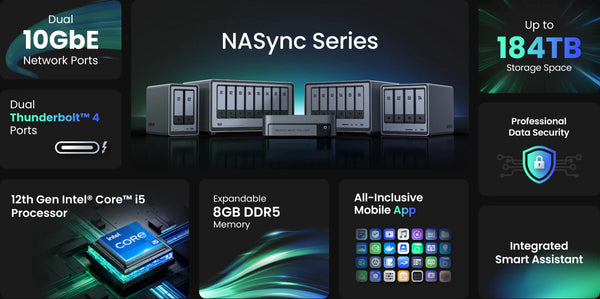
Key highlights of Ugreen's video editing focused NAS include:
- Dual 10GbE Ports - Enable extremely fast and reliable network transfers and link aggregation reaching 20Gbps.
- Dual Thunderbolt 4 - Directly connect cameras and high-speed peripherals up to blistering 40Gbps.
- 12th Gen Intel Core i5 CPU - Provides exceptional transcoding power for smooth media playback.
- 8GB DDR5 RAM - Helps accelerate timeline editing, file transfers and multitasking.
- Up to 184TB Storage Capacity - Scales to support growing media libraries for years to come.
- Advanced RAID Support - Configure optimized RAID for ideal performance, capacity and protection.
By consolidating massive video editing media assets into one high-speed yet affordable NAS, Ugreen empowers media productivity and takes collaborative creative workflows to the next level.