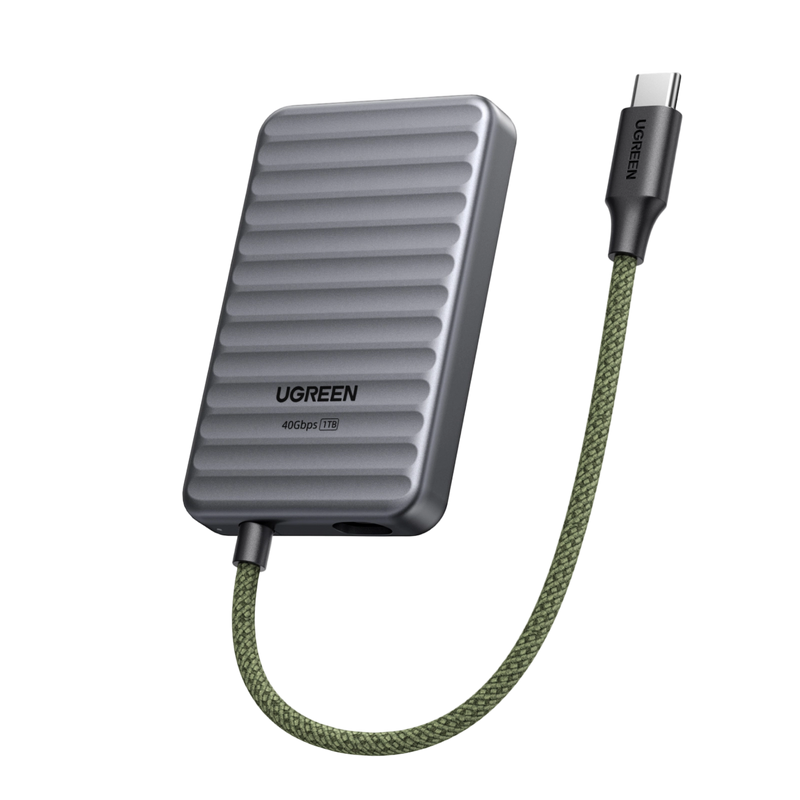
UGREEN NeoDrive Go D710 40Gbps Portable SSD (1TB)
- 1TB Large-Capacity Storage
- 40Gbps High-Speed Transfer
- Wide Compactibility
🎃Halloween Sale : Save Up to 25% OFF
Buy Now🎃Halloween Sale : Save Up to 25% OFF
Order Processing: Generally 1-3 business days.
Shipping & Delivery: Generally 3-8 business days.
*Please note that timelines may be extended under the following circumstances:
-Pre-orders for new products (see product page for details)
-Peak seasons (e.g., holidays, major sales promotions)
-Severe weather, remote delivery addresses, or carrier disruptions
*Please check our Shipping Policy for more details.
We offer a 30-day price guarantee for all products purchased on UGREEN NAS official website (ai-eu.ugreen.com). If you find the same model available at a lower price on this website within 30 days of your purchase, we will refund the difference.
Important Disclaimer: This guarantee does not apply to special offers (such as cashback, bonuses or bundled offers), out-of-date or second-hand items, prices offered by third parties, or unauthorized distribution channels.
We guarantee this product with a 2-year warranty against manufacturing defects. We cover all malfunctions caused by material or workmanship issues under normal use. Please note that accidental damage or improper care is not covered.
*Please check our Warranty Policy for more details.
You may return your purchase for a full refund or exchange within 30 days of receiving the product. Depending on product availability, items may be exchanged for an item of equal value. Please note that items must be unused and returned in original packaging with all accessories.
*Please check our Return Policy for more details.
Total:
€0,00
Take a quick quiz for personalized storage recommendations.

Product Comparison
Find your perfect NAS with a side-by-side comparison.
Promotions
Check out our latest deals and exclusive offers.
Support
Still have questions?
Network-attached storage (NAS) is a dedicated file storage solution that connects to a local area network (LAN), allowing multiple users and devices to access and share files seamlessly. It combines hardware and software with protocols like NFS, SMB, or AFP to enable centralized file sharing. NAS devices, which can be scaled up by adding more storage drives, often support redundant storage configurations like RAID for data integrity. Managed through a browser-based utility, NAS systems provide fast, secure, and reliable storage services, making them ideal for both home and enterprise environments where efficient file sharing and data management are crucial. Read more: What is NAS Storage?
NAS devices connect to your network via Ethernet or Wi-Fi, creating a local area network (LAN). They use file-sharing protocols like NFS and SMB/CIFS to allow multiple users to access stored data simultaneously. See more: How Does NAS Work?
No. UGREEN NASync systems are sold as diskless NAS devices. HDDs and SSDs are not included and must be purchased separately.
The maximum storage figure shown for each NAS describes the capacity supported by its SATA and, where applicable, M.2 drive slots. It does not describe storage included in the box.
Yes. UGREEN NASync supports compatible third-party drives from manufacturers including Western Digital, Seagate, and Toshiba. However, compatibility depends on the exact NAS model and drive model number.
UGREEN recommends NAS-rated CMR drives for always-on storage and RAID workloads. Before purchasing a drive, verify its model number in the UGREEN NAS Compatibility List.
For a home Plex server, choose your NAS based on how you watch videos:
To get started: Install Docker through the UGOS App Center, deploy Plex, and map your media folders to the container. Follow our step-by-step Plex NAS setup guide for detailed instructions.
Top apps include Plex for streaming, Docker for virtualization, and Syncthing for backups. PhotoPrism and NextCloud add photo/organization tools.
Most home NAS units use 15-30W under load, varying by drive count and CPU efficiency. Use ENERGY STAR-rated models or SSDs to cut costs. Calculate your NAS energy use here.
No. RAID can keep a storage pool available after certain drive failures, but it does not protect against accidental deletion, ransomware, file corruption, theft, fire, or failure of the complete NAS.
Important data should follow the 3-2-1 principle: maintain three copies, use two different storage media, and keep one copy off-site.
UGREEN NAS does support mixing drives of different capacities. However, we strongly recommend against using drives of varying sizes within the same RAID array.
Standard RAID configurations generally calculate usable capacity using the smallest drive in the array. For example, combining an 8TB drive and a 16TB drive in RAID 1 normally provides approximately 8TB of usable capacity, leaving the additional capacity on the larger drive unused.
No.
Yes. The UGREEN NAS mobile application supports automatic photo and video backup from iOS and Android devices. UGOS also provides file synchronization and backup tools, while Mac users can configure the NAS as a Time Machine destination. For the setup steps, see our step-by-step Time Machine setup guide. Windows computers can access shared storage through SMB and the UGREEN NAS client.
No. UGREENlink is designed to provide remote browser and application access without requiring a public IP address or manual router port forwarding.
DDNS is different: it normally requires a publicly reachable connection and router configuration. Tailscale is another alternative, but it requires Docker support and additional setup.
Minimize NAS noise by placing it on vibration-dampening pads, using low-RPM HDDs (e.g., WD Red Pro), and ensuring proper ventilation. Silent fan modes and SSD upgrades also help. See our step-by-step quieting guide.